Triggers and faceoffs
TriggerGate reports presses and releases of its inputs to the connected clients, and on request it runs a faceoff: it numbers the participants' first presses in time order, locks out anyone who pressed too early, and identifies presses closer than the platform's limit as tied, choosing their order at random instead of letting the input number decide. This page shows, in pictures, what TriggerGate does with each button press from the moment a client prepares a faceoff to the moment it clears it, and what it reports to clients along the way. It is for show engineers who run faceoffs and for developers who write clients. Each figure has a description under it, so the page also reads without the pictures.
The press and lockout rules below describe the Windows and Uno service after Slice J. The ESP32 firmware still needs the same rule change; where its current behavior differs, the page marks that explicitly.
How to read the diagrams
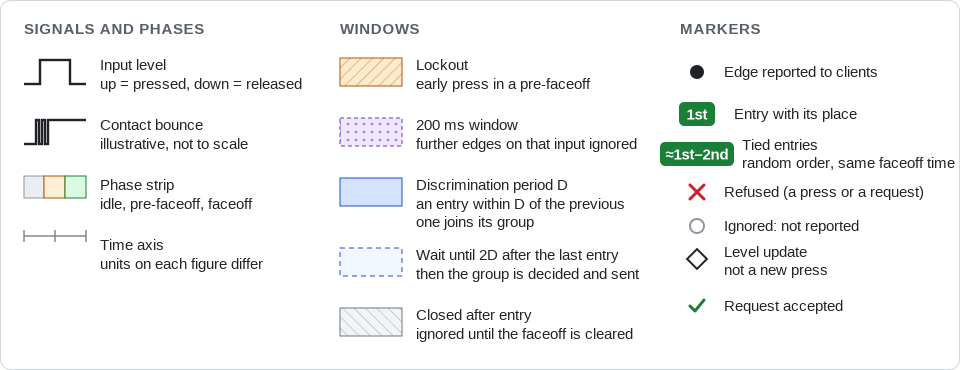
Legend for every figure on this page.
- Each input has its own lane. Its line is the button's level: up is pressed, down is released. Each input in a request says which edge is its press (rising or falling). An input whose press is a falling edge works the same way; only the wiring is upside down.
- The strip at the top shows the phase: idle, pre-faceoff or faceoff.
- Shaded bands are windows of time: a lockout (hatched amber), the 200 ms window (dotted violet), the discrimination period D and the wait until 2D after a group's last entry (blue), and closed after entry (hatched gray). Each band also carries a text label.
- Markers show what clients are told. A filled dot is an edge report. A green box is a faceoff entry with its place: 1st, 2nd, 3rd and so on. A box with "≈" and a range of places, such as "≈1st–2nd", marks tied entries. A red cross is something refused. A hollow circle is an edge that is ignored and not reported. A hollow diamond is a level update.
- Time scales differ a lot between figures, from seconds down to microseconds. Each figure labels its own axis.
A few words used below:
- Edge report: the
Edgenotification a client receives for a press or a release. It names the input and the direction. For a faceoff entry it also carries its place (the ordinal) and the faceoff time. The API reports the place as a zero-based number, with 0 meaning 1st; see the hub API. For a press during a lockout it carries the lockout time remaining. - Faceoff time: the time from the start of the faceoff to the entry.
- Level update: a correction of an input's displayed level that is not a new press. It never carries a place or starts a lockout.
Ordinary triggers
Outside a faceoff, every input is a plain trigger. Each change is sent to every client connected to that device as an edge report, which says:
- the input (numbered from 0) and the direction: rising or falling;
- whether a hardware interrupt or the polling of the inputs found it (see the next section);
- the edge's own time, twice: its stamp on the server's monotonic clock and the same instant in UTC. These belong to the edge itself, even when it is a faceoff entry that shares its faceoff time with others. What the two times promise is explained in Clocks and time;
- whether it is a test edge from Trigger random rather than a real press.
A client that connects is first sent the device's current state, including the last report of every input, so it starts with the right levels. Edges are filtered by the 200 ms rule to keep a bouncing contact from flooding the network.
Interrupt and polled edges
TriggerGate learns about a change in one of two ways.
- Polling: the server reads all its inputs at intervals (every 10 ms on an Advantech card, in a continuous loop on the Uno, at each USB report from an X-keys). Every input supports polling, and the polled level is the authority on whether an input is up or down.
- Interrupts: on an Advantech card, an input can be armed to raise a hardware interrupt the moment it changes. The server stamps the interrupt as it arrives, so the time is far more precise than a poll.
On an Advantech card, interrupts are armed only for a faceoff or pre-faceoff that asks for them, and only on its participants. The next poll also observes the input level. The interrupt or poll requested by the faceoff decides an entry or lockout; duplicate observations do not create a second press.
Each faceoff or pre-faceoff request chooses which kind decides it:
- Polling is the default, and every input on every platform supports it. A request that does not say asks for polling.
- Interrupts are available only on Advantech cards, and only on inputs whose card can raise them. A request for interrupts is refused if any participant cannot provide them, if there are more participants than can be armed at once, or if the card refuses to arm. It is never served by polling instead.
The ESP32 is a special case: it stamps every edge of every input in an interrupt handler, so its faceoffs are timed by interrupt stamps although its requests and reports say "polled". See Platforms and devices.
1. The sequence
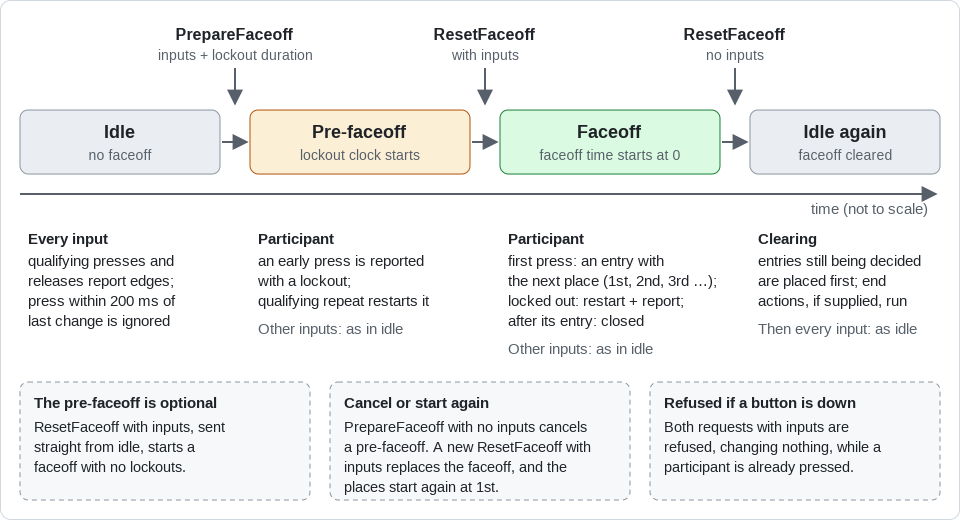
Figure 1. The phases of a faceoff and the client requests that move between them. Not to scale.
A client drives a faceoff with two requests.
- PrepareFaceoff with a list of inputs and a lockout duration starts a pre-faceoff. During it, a participant that presses early is locked out (see figures 2 and 3). PrepareFaceoff with no inputs cancels the pre-faceoff.
- ResetFaceoff with a list of inputs starts the faceoff. Faceoff time counts from here, and places start at 1st. Each participant's first press is its entry. A new ResetFaceoff with inputs replaces the faceoff and starts the places again at 1st.
- ResetFaceoff with no inputs clears the faceoff. Entries still waiting for their place are placed first, under the faceoff they entered. Any actions supplied with the request then run (see Trigger actions).
The pre-faceoff is optional. A faceoff started straight from idle simply has no lockouts. A faceoff stays armed until a client clears it, even after every participant has entered. Inputs not named in the current request behave as they do when idle.
A change of phase (a new faceoff, a clear, a pre-faceoff) waits until every entry still waiting for its place has been placed, so no entry is dropped or counted in the next faceoff. If the device goes away, waiting entries are placed at once.
Both requests are refused, and nothing changes, if a participant's button is already pressed (figure 8). They are also refused
while a button health check holds the device; a request with no inputs is still acknowledged but changes
nothing. On the Advantech card, if the server loses input events during an interrupt faceoff, it cancels the faceoff and sends a
FaceoffCancelled notification; the web page shows it in its log. An ESP32 board does the same when its queue of input events
overflows, whatever is running: it cancels any faceoff or pre-faceoff, ignores its inputs until they have been quiet again, and
refuses faceoff requests meanwhile, for at least 0.6 seconds (see
Lost input events).
2. Pre-faceoff lockout
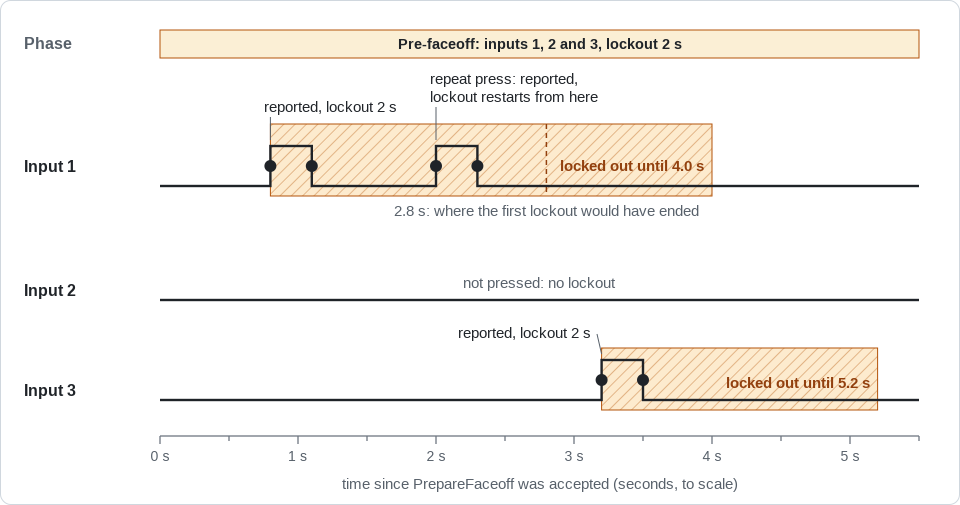
Figure 2. A pre-faceoff with a 2 second lockout. Time in seconds, to scale.
- A participant pressed during the pre-faceoff is locked out for the requested duration, counted from that press. The press is reported at once, with the full lockout duration as its lockout time remaining. Input 1 is pressed at 0.8 s and is locked out until 2.8 s.
- A repeat press restarts the lockout from the new press. Input 1 is pressed again at 2.0 s, so its lockout now ends at 4.0 s. The time is not added up; it simply starts again.
- An input that stays quiet has no lockout (input 2).
- Releases are reported as ordinary edges and do not change the lockout.
- The last qualifying press decides when the input unlocks. A detected press inside 200 ms of that input's last detected change, in either direction, is ignored before it can restart the lockout or be reported. This includes changes detected while an interrupt gate is closed or an edge report is suppressed. A press at exactly 200 ms qualifies.
- Every qualifying press restarts the lockout and is reported with the new full duration, even when an earlier lockout is still running. This lets clients keep the displayed countdown in step. Releases never restart it.
- On a polled input, a press and release entirely between reads cannot be detected. An Advantech interrupt gate counts callbacks it suppresses and remembers their stamps for debounce history, although those callbacks do not establish the change's direction. Hardware masking on the ESP32 can hide transitions altogether.
This rule uses the last change in either direction. A release can therefore delay a new press, including a release that was not reported. This is the chosen interpretation of the general debounce rule and can be revised if show behavior calls for it.
3. A lockout carried into the faceoff
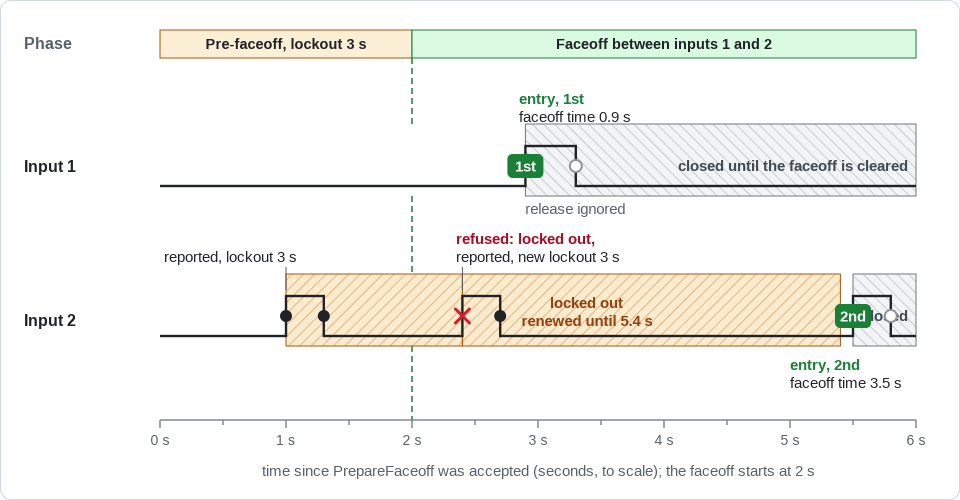
Figure 3. A 3 second lockout that is still running when the faceoff starts at 2.0 s. Time in seconds, to scale.
- A lockout that is still running when the faceoff starts carries on into the faceoff. Input 2 pressed early at 1.0 s, so it is locked out until 4.0 s.
- Input 2 is the first to press once the faceoff has begun, at 2.4 s, but the press is refused: it gets no place. It is still reported, with a fresh 3 s lockout ending at 5.4 s, so a client can show the penalty. A refused press does not close the input. Input 2 pressed first in the faceoff, but the lockout cost it 1st place.
- Meanwhile other participants enter as usual. Input 1 presses at 2.9 s and enters 1st, with a faceoff time of 0.9 s.
- Once the lockout has ended, the next press is an entry. Input 2 presses at 5.5 s and enters 2nd. Holding the button down until the lockout ends does not enter; it takes a new press.
4. Entries in a faceoff, and closed after entry
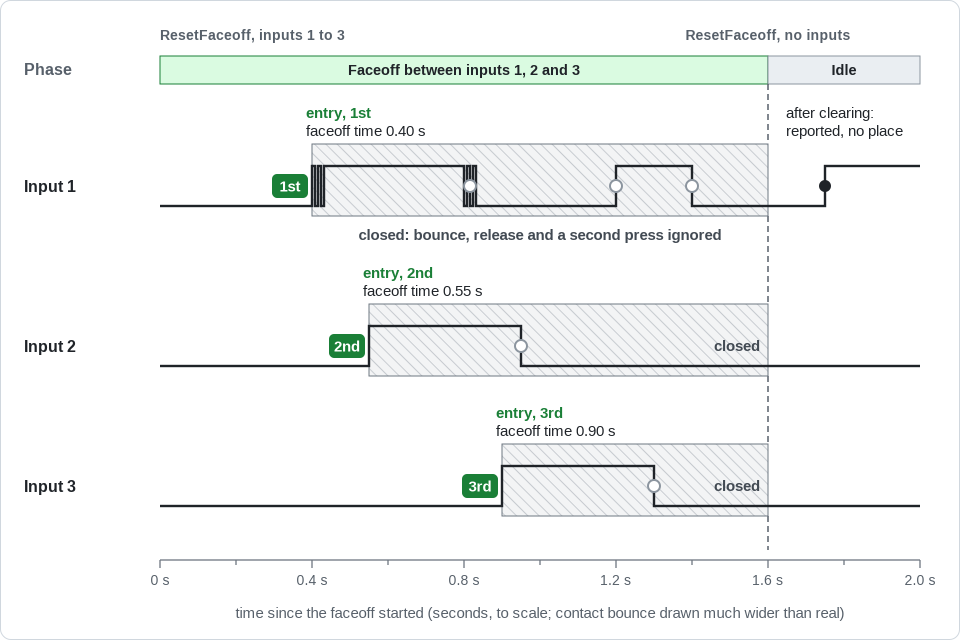
Figure 4. A faceoff between three inputs, cleared at 1.6 s. Time in seconds, to scale; contact bounce drawn much wider than real.
- Each participant's first qualifying press is its entry. Entries are placed by time: 1st, then 2nd, 3rd and so on. Every participant can earn a place, not only the winner.
- Each entry is reported with its place and its faceoff time. If the request supplied actions, 1st place runs the winner actions and any later place runs the loser actions, as each place is decided.
- After its entry an input is closed until the faceoff is cleared. Contact bounce, the release, and any later press on that input are not reported as edges. Input 1's second press at 1.2 s is ignored.
- The input's detected changes still count toward the 200 ms rule. A quick press after the faceoff is cleared is ignored if it falls within 200 ms of the last detected change, including a release while the input was closed.
- A closed input's display can still be brought up to date with a level update, so a released button stops showing as pressed. Depending on the platform this happens during the faceoff or once it is cleared. It is never a new press.
- After the faceoff is cleared, every input behaves as idle again. Input 1's press at 1.75 s is an ordinary edge with no place because its last detected change was more than 200 ms earlier.
- On the Advantech card's interrupt path, a waiting participant's first interrupt counts as a press even when the button is already back up by the time the card is read. A very short tap still enters.
The debounce history also crosses phase boundaries. A press that bounces across the start of a direct faceoff is ignored if it falls within 200 ms of that input's last detected change. Likewise, a winner's release bounce cannot become an entry in a new faceoff within that window. An isolated press after the window enters as before. A queued Uno read is judged from its own stamp against the starts of both the pre-faceoff and faceoff; one stamped in the pre-faceoff still follows pre-faceoff rules if processed after the faceoff starts.
How soon an entry is reported depends on how it was timed. Figures 5 and 6 show the two ways.
5. Interrupt faceoffs: the discrimination period D and ties
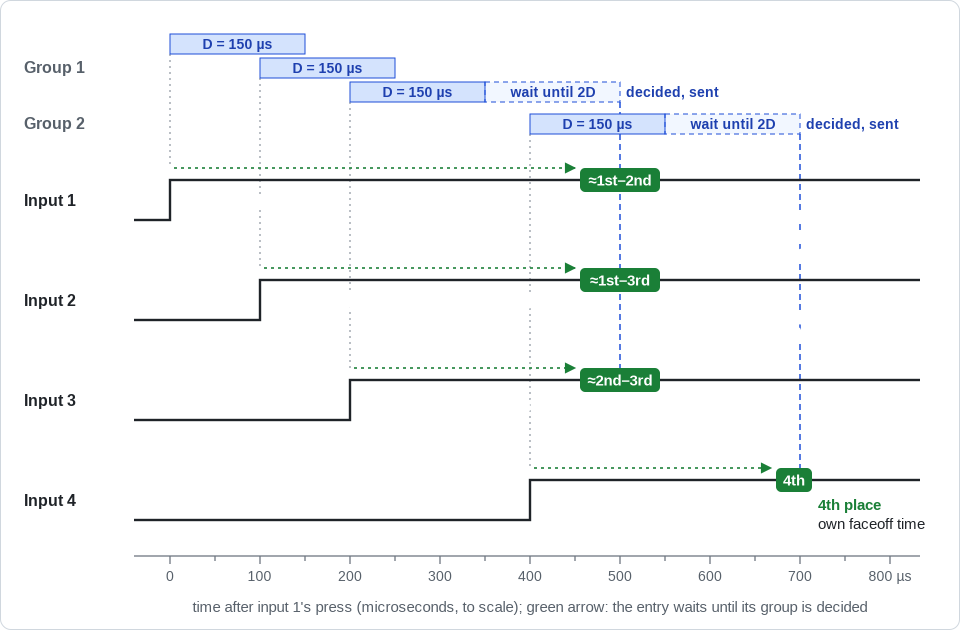
Figure 5. An interrupt faceoff with D = 150 µs, the Advantech default. Time in microseconds after the first press, to scale.
With interrupts, each press is stamped the instant it is signaled. Within the discrimination period D, small differences in input circuits, cable and the time an interrupt takes to arrive can put two stamps in either order, so ordering by stamp there would favor one input by accident. TriggerGate treats entries that close as tied, chooses their order at random, and tells the client which entries they are.
- Entries form groups by the gap between neighbors. Taken in stamp order, an entry stamped no more than D after the previous entry joins its group; a gap of more than D starts the next group. A group is therefore a chain and can be longer than D. In figure 5, input 2 is 100 µs after input 1 and input 3 is 100 µs after input 2, so all three are one group, although input 3 is 200 µs after input 1. Input 4 is 200 µs after input 3, more than D, so it starts the next group.
- The group is decided 2D after its last entry. In figure 5 that is 2D after input 3's press, at 500 µs. Each entry that joins the chain moves the decision later. The wait leaves room for an entry that happened within D of the last one but reached the server a little late. The reports of the group are sent then, and so are its winner and loser actions.
- The group's entries get consecutive places in an order chosen at random, with one rule: two entries stamped more than D apart keep their stamp order, because the platform can tell them apart. In figure 5, input 1 always comes before input 3, so the possible orders are 1-2-3, 1-3-2 and 2-1-3, each equally likely: input 1 gets 1st or 2nd place, input 2 any of 1st to 3rd, and input 3 2nd or 3rd. Input numbers and arrival order never decide anything. Every entry of the group reports the same faceoff time: the time of its first entry.
- The order is chosen with a cryptographic random number generator on Windows and the Uno, and with the board's hardware random number generator on the ESP32. The service writes one line to its log for each tie, with the inputs, their offsets from the first in microseconds and the random order.
- Up to 16 entries in one group are always ordered exactly: every allowed order is equally likely. A larger group is ordered exactly too when it is not too entangled. Counting the allowed orders takes time and memory that grow exponentially with the entries packed within a few D of one another, and the decision is made while the clock runs, so the service counts at most 65,536 states per group (every group of up to 16 entries fits, and the memory for it is allocated when the faceoff starts). Beyond that, which needs a group of well over 16 entries in a tight chain, the order is still chosen at random and an entry stamped more than D after another is never placed ahead of it, but not every allowed order is equally likely. The server then logs a warning that says so. The ESP32 has at most eight inputs, so its random orders are always exact.
- The next group is decided the same way and its places follow on. In figure 5, input 4 is alone in its group: it is decided 2D after its press, at 700 µs, and gets 4th place with its own faceoff time.
- Each participant enters only once, so a chain cannot grow forever. A group of n entries is decided at most (n + 1) × D after its first entry. With D = 150 µs that is 450 µs for two entries and under 10 ms even for 63 entries pressed in a steady chain.
- An entry that reaches the server even later, after its group was decided, is placed after that group, and the server logs a warning.
Why chains: suppose inputs are stamped at 0, 149 and 155 µs with D = 150 µs. The entries at 149 and 155 µs are only 6 µs apart, far too close to call. A rule that measured every gap from the group's first entry would put 155 µs in a later group and so report it confidently behind 149 µs. Chaining keeps all three together and orders only the pair that is clearly apart (0 and 155 µs).
How a client spots a tie: within one faceoff, two entries have the same faceoff time if and only if they were decided in the same group. There is no separate tie flag. Distinct groups never share a faceoff time: a group whose time would not be later than the previous group's is reported one tick after it. Within a group, entries stamped within D of each other had their order chosen at random; entries stamped more than D apart are still in the order they happened, even though they share the group's time. Each report also carries the entry's own monotonic and absolute times, which differ between tied entries, so do not use those to detect ties. The web page marks a tied place with "≈" and the tooltip "Too close to call: the order was drawn at random".
Accept the random order or call a tie. The resulting places are a complete result in which no input was favored, so a show can use them as they are. A show that prefers to treat close presses as level can call a tie instead, because the tied entries are identified. Winner and loser actions that the server runs itself follow the random order. How a client reads a tie is in Hub API and .NET client library.
D is set per service:
| Platform | D | Wait after a group's last entry | Set with |
|---|---|---|---|
| Advantech card on Windows | 150 µs by default, 0 to 100,000 µs | 2D (300 µs by default) | TriggerGate:InterruptDiscriminationMicroseconds in the service's appsettings.json, or --TriggerGate:InterruptDiscriminationMicroseconds=200 on the command line. The value in effect is logged at start-up. 0 ties only identical stamps and does not wait. |
| ESP32 | 50 µs | 300 µs | Fixed in the firmware build and logged at start-up ("Faceoff timing: guard=50us collection=300us"). |
6. Polled faceoffs
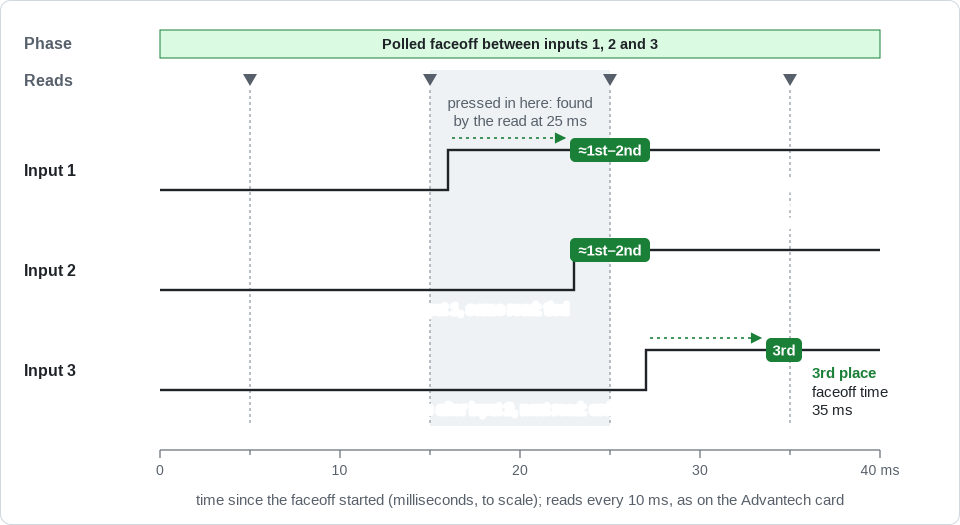
Figure 6. A polled faceoff with reads every 10 ms. Time in milliseconds since the faceoff started, to scale.
With polling, the server reads all inputs at intervals. A read shows which inputs changed, but not in what order.
- All entries found by the same read are tied. Their order is chosen at random from every possible order, each equally likely, with the same random number generators as interrupt ties, and they all report the read's time as their faceoff time. Inputs 1 and 2 are pressed 7 ms apart, but the read at 25 ms finds both.
- Entries found by different reads are ordered by read. Input 3 is pressed only 4 ms after input 2, but after the read at 25 ms, so it is placed after them.
- So the read interval is the resolution. Presses almost a whole interval apart can tie, and presses close together are ordered when a read falls between them.
- A polled entry is reported as soon as its read is processed. Its faceoff time is the read's time, up to one interval after the press.
- A client spots a polled tie in the same way, by equal faceoff times, and the show has the same choice: keep the random ordern order or call a tie (see section 5).
A read is one poll of every port on an Advantech card, one read of the input port on the Uno, and one USB report from an X-keys.
7. The 200 ms rule
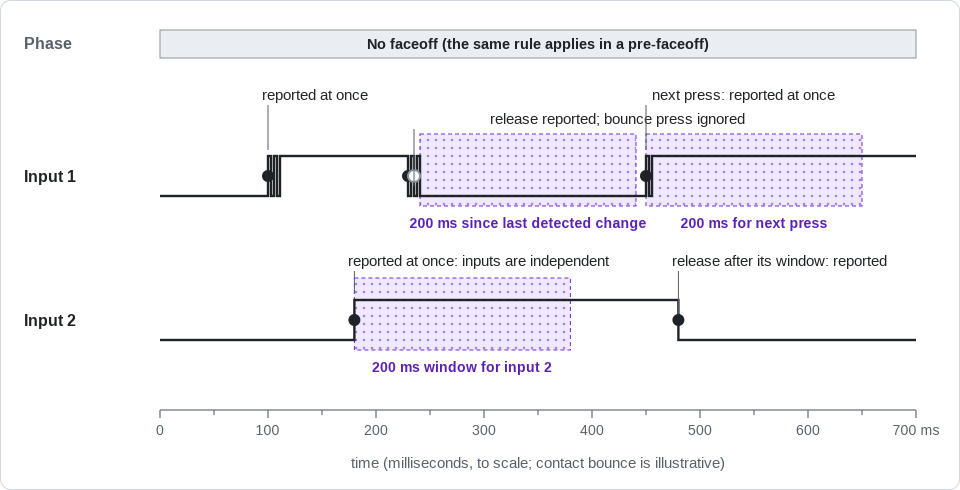
Figure 7. Edges with no faceoff running. Time in milliseconds, to scale; contact bounce is illustrative.
The same 200 ms rule applies to every input in idle, pre-faceoff and faceoff, including a participant waiting to enter, one held in a lockout, and one already closed after entry:
- Each detected change starts a 200 ms window on that input. A press detected strictly inside the window since its last detected change is ignored before entry and lockout decisions. The change starts a new window even if its edge report was suppressed, or it happened while the input was closed. At exactly 200 ms, the press qualifies.
- A qualifying press is reported at once, except that an input already closed after entry cannot send another edge report. Releases are reported unless the input is closed after entry, and never restart a lockout. A release updates press-debounce history even if it is not reported.
- A release can be reported during the press window. If a release was hidden or a stable level later differs from what was reported, the server can send a level update, not a new edge. In figure 7, input 1's release is reported; its bounce presses are ignored.
- Inputs are independent. Input 2's press during input 1's window is reported at once.
- One consequence: a real second press within 200 ms of the last detected change cannot enter, even if that change was a release or was hidden from clients. The final level can still be corrected without inventing a press.
- On the Advantech interrupt path the native gate itself enforces the 200 ms quiet period before passing a callback to the service. Each callback it suppresses moves the gate's next opening to 200 ms after that callback's stamp, even if the service is busy draining earlier events. A permanently closed winner's latest suppressed stamp is retained for the next phase. These callbacks have no known direction: their stamps update debounce history but cannot themselves restart a lockout. A held level is reconciled from a later read. The service applies the press rule again after events leave the native queue.
Platforms differ in the details:
| Platform | The 200 ms window covers | The level update arrives as |
|---|---|---|
| Advantech card | Last detected change in either direction, shared by interrupt and polled edges | An InputLevels notification |
| Uno and X-keys | Last detected change in either direction | An InputLevels notification |
| ESP32 firmware pending parity | Currently uses its own interrupt masking and reporting rules; the new service rule is specified for the firmware but has not been applied there yet | An InputLevels notification |
8. A button already down
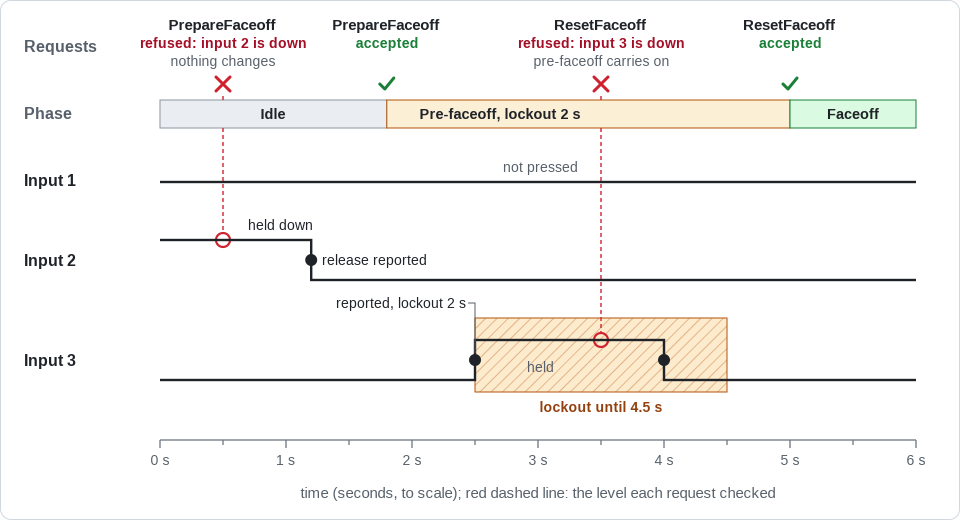
Figure 8. Requests refused because a participant is already pressed. Time in seconds, to scale.
- PrepareFaceoff and ResetFaceoff with inputs are refused when any participant is already pressed, that is, already at the level its press goes to.
- Nothing changes. If the server was idle, it stays idle. If a pre-faceoff or faceoff was running, it carries on as before.
- The response is unsuccessful. Its message names the inputs, and its
HeldInputsfield lists them, so a client can show which button to check. - The check is made at the moment the change would happen: with a fresh read on the Advantech card, and from the last known level elsewhere (and on the Advantech card too if that read fails). An input whose level is not known is not counted as pressed. A press that lands just after the check is simply an early press: a lockout in a pre-faceoff, an entry in a faceoff. A press in the few microseconds between the card read and the opening of the interrupts is counted as received but not passed on, which the faceoff health report shows.
- On the Advantech card, a refused request for interrupts has already armed its own inputs before the check, so the running faceoff's interrupts are armed again. For a few milliseconds (about 2 ms for each of the two re-arms) the running faceoff gets no interrupts, and one in that gap is not delivered. If the arming cannot be restored, the refusal message says so.
- Common causes are a contestant resting on a button, a stuck button, and an input set to the wrong edge, whose resting level then counts as pressed.
Scheduled faceoffs on the ESP32
An ESP32 that follows a PTP clock can also start a faceoff at an agreed instant instead of at once, so several boards on the same PTP network can open a faceoff together. The client sends the start time on the PTP timebase, with the PTP domain, grandmaster and timescale it expects, and optionally the largest clock error it accepts.
- The request is refused, and nothing changes, if the board's PTP clock is not locked or its status is stale, if the source is not the one the request names, if the clock's error is unknown or larger than the limit given, if the start is in the past or less than 100 ms ahead, or if a participant is held down.
- Until the start, participants' edges are reported as ordinary edges. At the start, a participant that is held down cancels the faceoff.
- Faceoff times are counted from the scheduled instant on the PTP timebase.
- If the clock is lost, goes stale, changes source or exceeds the error limit after the request was accepted, the scheduled faceoff
is canceled, even after it has started, and the board sends a
FaceoffCancellednotification. There is no fallback to a local start. - The Windows and Uno services refuse scheduled requests.
How to give a board a PTP clock, and what the web page shows about it, is in Clocks and time.
After a faceoff: the health report
When a faceoff or pre-faceoff ends, TriggerGate sends each client of the device a faceoff health report: how much stray activity each input produced while it ran, such as extra interrupts and polled changes beyond the entry. Counts a platform cannot measure are left empty. It helps find a chattering button or noisy wiring without a separate test. See Input diagnostics.
Values per platform
| Platform | Interrupt faceoffs | Polled faceoffs |
|---|---|---|
| Advantech card on Windows | D = 150 µs by default; places are reported 2D = 300 µs after a group's last entry | Inputs read every 10 ms |
| ESP32 | Every entry is stamped by interrupt, with D = 50 µs and places reported 300 µs after a group's last entry. Requests ask for polling and reports say "polled", because the board lists no interrupt inputs | No separate polled path |
| Advantech UNO | Not available | No guard: one read ties its entries, different reads order them. On one UNO-220 at 400 kHz I²C with core_freq_min=500, the default Native reader ordered every tested gap from 100 µs, including bursts (7,272/7,272 comparisons in 1,512 new-rules trials); stalls can widen ties. See Accuracy for the other read modes and evidence limits |
| X-keys | Not available | One USB report per interval: 1 ms on the XK-12 Switch Interface, about 30 ms between key reports on the XK-12 Jog & Shuttle |
A client can read an instance's ordering resolution for each kind of faceoff from its configuration (GetConfig); the value is null
where it is unknown, and the ESP32 does not send it. What these figures mean for the closest presses you can expect to separate is
in Accuracy.